


Use LDPlayer to Play Dames JumpJoy on PC
Dames JumpJoy is a Board game developed by Cowcona, and with the best Android emulator, LDPlayer, you can now enjoy Dames JumpJoy on your computer.
Playing Dames JumpJoy on PC allows you to harness the full power of your computer's CPU and memory resources, without worrying about lag or crashes. You're no longer constrained by battery life, mobile data, or interruptions—play for as long as you want.
LDPlayer, one of the Android emulators for Windows PC, is designed specifically for mobile gamers. Based on Android 9.0, it enhances your gaming experience on PC by providing faster performance and higher FPS.
Moreover, LDPlayer offers unique emulator features including multi-instance support, macros, synchronization, and other features not available on mobile devices. Start downloading and playing Dames JumpJoy on your computer now!
Tactical Triumphs: Checkmate Challenges in Checkers! Welcome to the captivating world of strategic brilliance and checkerboard mastery! Immerse yourself in the timeless classic, where every move is a step towards triumph or defeat. In this riveting game of Checkers, the black and white squares become your battlefield, and each piece is a potential game-changer.Experience the thrill of calculated jumps and tactical maneuvers as you navigate through the checkered landscape. Whether you're a novice looking to learn the ropes or a seasoned player seeking the ultimate challenge, Checkers offers a dynamic blend of simplicity and complexity.
Engage in a battle of wits where each piece holds the power to turn the tide. Will you seize the opportunity to crown your pieces and dominate the board, or will your opponent outmaneuver you in a strategic dance of kings and pawns?
Checker enthusiasts will revel in the sleek design and intuitive gameplay that make every move feel like a stroke of strategic genius. Challenge friends, family, or players from around the world in thrilling head-to-head matches that showcase your tactical prowess.
With an array of game modes, from casual matches to intense tournaments, Checkers caters to every skill level. Sharpen your skills in solo play against challenging AI opponents, or dive into the competitive realm where only the most cunning emerge victorious.
Unlock achievements, collect rewards, and climb the global leaderboards as you hone your skills and become a Checkers champion. The immersive graphics and responsive controls ensure an unparalleled gaming experience, making every jump, capture, and kinged piece a satisfying moment of triumph.
As you embark on this strategic journey, the simplicity of Checkers belies the depth of its gameplay. Discover the beauty of calculated moves, defensive brilliance, and the exhilaration of a perfectly executed double jump. This is not just a game; it's a mental challenge that keeps you coming back for more.
Checkerboard conquest awaits – are you ready to claim victory and become the master of the board? Whether you're reliving childhood memories or discovering the game for the first time, Checkers promises endless hours of strategic fun, bringing players together across generations. Challenge your mind, plot your moves, and experience the timeless joy of Checkers today!
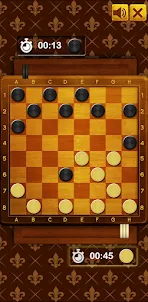
Checkers is a board game (Draughts, Dame, Damas – various languages) is well-known ancient game, that still very popular over the world for its simple rules and addictive game play, which hide deep tactics and variability.
Intuitive touch controls make it easy to play checkers, just tap a piece and then tap where you want it to go.
Checkers supports both 1 player and 2 player game play, so you can play against friends or test your skills against a challenging computer opponent.
I hope you enjoy playing Checkers with your friends or your family.
Screenshots and Videos of Dames JumpJoy PC



Why Play Dames JumpJoy on PC with LDPlayer?
How to Download Dames JumpJoy on PC?
Download and install LDPlayer on your computer
Locate the Play Store in LDPlayer's system apps, launch it, and sign in to your Google account
Enter "Dames JumpJoy" into the search bar and search for it
Choose and install Dames JumpJoy from the search results
Once the download and installation are complete, return to the LDPlayer home screen
Click on the game icon on the LDPlayer home screen to start enjoying the exciting game
If you've already downloaded the APK file from another source, simply open LDPlayer and drag the APK file directly into the emulator.
If you've downloaded an XAPK file from another source, please refer to the tutorial for installation instructions.
If you've obtained both an APK file and OBB data from another source, please refer to the tutorial for installation instructions.